AI agents are getting remarkably capable. They can write and execute code, search the web, manage calendars, and orchestrate complex multi-step workflows. But there is a glaring gap in most agent toolkits: email. Despite being the backbone of professional communication for decades, email remains surprisingly difficult for AI agents to use natively.
The problem is not a lack of email APIs. Services like SendGrid, Mailgun, and Amazon SES have been around for years. But these platforms were designed for a fundamentally different use case: sending marketing campaigns and transactional notifications on behalf of human users. They are one-directional pipes optimized for bulk delivery and template rendering. They were never built for an AI agent that needs its own inbox, receives messages in real time, and carries on threaded conversations autonomously.
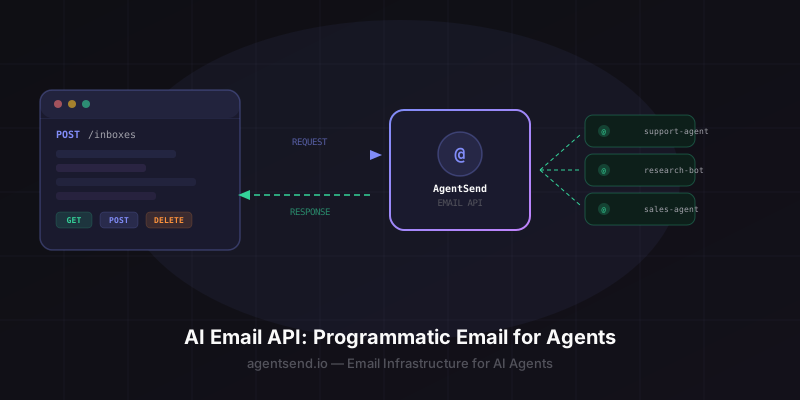
This is where the concept of an AI email API comes in. An AI-native email API treats the agent as a first-class participant in email communication, not just a sender. It provisions inboxes programmatically, delivers incoming messages via webhook, tracks conversation threads, and lets agents send replies without any human in the loop.
In this guide, we will break down what makes an email API truly AI-native, walk through the most common use cases for agent email, and show you how to get your agent sending and receiving email in under five minutes using AgentSend.
What Makes an Email API "AI-Native"?
Not all email APIs are created equal, and the distinction matters when you are building for agents. Traditional email infrastructure was designed with a human operator in mind: someone who logs into a dashboard, configures templates, uploads contact lists, and monitors delivery metrics. That model breaks down completely when the "user" is an autonomous program running in a loop.
Here is how traditional email APIs compare to an AI-native approach:
| Capability | Traditional API (SendGrid, Mailgun) | AI-Native API (AgentSend) |
|---|---|---|
| Direction | Send only (outbound-focused) | Bidirectional (send and receive) |
| Inbox model | Shared domain, no per-agent inboxes | Dedicated inbox per agent |
| Incoming mail | Inbound parsing as an add-on | Webhook-driven, real-time delivery |
| Threading | Not tracked | Thread-aware with conversation history |
| Provisioning | Manual dashboard setup | Fully programmatic via API |
| Signup | Requires human verification | No human signup required |
| Primary use case | Marketing, transactional notifications | Agent-to-human conversation |
The key difference is philosophical. Traditional providers think of email as a broadcast channel. An AI-native API thinks of email as a conversation interface. Your agent is not blasting out newsletters; it is engaging in back-and-forth dialogue with real people, and the infrastructure needs to support that pattern natively.
Why webhooks matter for agents. Polling an inbox is slow, wasteful, and introduces latency. Webhook-driven delivery means your agent is notified the instant a message arrives, enabling real-time conversational flows without constant API polling.
Common Use Cases for AI Email Agents
Once your agent has a real email address and the ability to send and receive messages, an entire category of workflows opens up. Here are the most common patterns we see developers building with AgentSend.
Customer Support Agents
An AI agent monitors a support inbox, triages incoming requests, answers common questions instantly, and escalates complex issues to human agents with full context attached. The agent maintains conversation threads so customers get coherent follow-ups rather than disconnected one-off replies. See our customer support agent guide for a complete walkthrough.
Research Agents
A research agent that needs to contact external sources, request information, or follow up on inquiries can use email as its primary communication channel. It sends outreach emails, processes responses as they arrive via webhook, and synthesizes findings across multiple threaded conversations. Learn more in our research agent guide.
Scheduling and Coordination Agents
Agents that manage calendars, coordinate meetings, or handle event logistics often need to email participants. A scheduling agent can send meeting invitations, process RSVPs, handle rescheduling requests, and send reminders, all through its own dedicated email address. See the scheduling agent guide.
Sales Outreach Agents
An AI sales agent can send personalized outreach emails, track which prospects respond, carry on qualification conversations, and hand off warm leads to human sales reps. Because AgentSend tracks threads natively, the agent always has the full conversation history when composing follow-ups. Read the full sales outreach agent guide.
Monitoring and Alerting Agents
Infrastructure monitoring agents, financial tracking agents, or any system that needs to notify stakeholders can send structured email alerts. When recipients reply with questions or acknowledgments, the agent processes those responses and takes appropriate action, closing the feedback loop.
How AgentSend's Email API Works
The core workflow has four steps: create an inbox, receive messages via webhook, send replies through the API, and manage threads for conversation context. Here is each step with working code examples.
1. Create an Inbox
A single API call provisions a new email address for your agent:
# Create an inbox for your AI agent
curl -X POST https://agentsend.io/inboxes \
  -H "Authorization: Bearer YOUR_API_KEY" \
  -H "Content-Type: application/json" \
  -d '{
    "name": "support-agent",
    "webhookUrl": "https://your-server.com/webhooks/email"
  }'
{
  "id": "inbox_abc123",
  "name": "support-agent",
  "address": "support-agent@agentsend.io",
  "webhookUrl": "https://your-server.com/webhooks/email",
  "status": "active",
  "createdAt": "2026-04-14T10:00:00Z"
}
Your agent now has a live email address: support-agent@agentsend.io. On Pro and Enterprise plans, you can use custom domains like support@yourcompany.com.
2. Receive Messages via Webhook
When someone emails your agent, AgentSend delivers the full message payload to your webhook URL as an HTTP POST:
{
  "event": "message.received",
  "inboxId": "inbox_abc123",
  "message": {
    "id": "msg_xyz789",
    "threadId": "thread_001",
    "from": "customer@example.com",
    "subject": "Need help with my account",
    "text": "Hi, I am having trouble accessing...",
    "html": "<p>Hi, I am having trouble accessing...</p>",
    "attachments": [],
    "receivedAt": "2026-04-14T10:05:00Z"
  }
}
Your agent receives the sender address, subject, full body (plain text and HTML), any attachments, and a threadId for tracking the conversation. No polling required.
3. Send Replies
To reply, your agent sends a POST request with the threadId to keep the conversation threaded:
curl -X POST https://agentsend.io/messages \
  -H "Authorization: Bearer YOUR_API_KEY" \
  -H "Content-Type: application/json" \
  -d '{
    "inboxId": "inbox_abc123",
    "threadId": "thread_001",
    "to": "customer@example.com",
    "subject": "Re: Need help with my account",
    "text": "Hi, I have looked into your account and..."
  }'
4. Manage Threads
Fetch the full conversation history to give your agent context before composing a reply:
curl https://agentsend.io/threads/thread_001/messages \
-H "Authorization: Bearer YOUR_API_KEY"{
"threadId": "thread_001",
"subject": "Need help with my account",
"messages": [
{
"id": "msg_xyz789",
"from": "customer@example.com",
"text": "Hi, I am having trouble accessing...",
"receivedAt": "2026-04-14T10:05:00Z"
},
{
"id": "msg_abc456",
"from": "support-agent@agentsend.io",
"text": "Hi, I have looked into your account and...",
"sentAt": "2026-04-14T10:05:03Z"
}
]
}Feeding the full thread into your agent's context window means it can compose replies that account for the entire conversation, not just the latest message. This is critical for maintaining coherent, multi-turn email conversations.
Tip: Use the threadId in every reply to keep messages grouped. This ensures recipients see a clean conversation thread in their email client, just as they would with a human correspondent.
Free Tier: Get Started in Under 5 Minutes
AgentSend is designed so you can go from zero to a working agent inbox in minutes, not hours. Here is what the free tier includes:
- 10 emails per day per inbox (send and receive combined)
- Unlimited inboxes on the
@agentsend.iodomain - Webhook delivery for incoming messages
- Thread tracking for conversation context
- REST API and MCP skill access
- No credit card required
The free tier gives you everything you need to prototype, test, and validate your agent's email workflows. When you are ready for production, the Pro plan at $9/month unlocks 1,000 emails per day, custom domain support (send from agent@yourcompany.com), priority deliverability, and advanced webhook configuration.
Getting started: Sign up at agentsend.io/auth/signup, generate an API key from Settings, and create your first inbox with a single API call. Your agent can be sending and receiving email in under five minutes.
Here is the fastest path from signup to a working agent email:
# 1. Create an inbox
curl -X POST https://agentsend.io/inboxes \
  -H "Authorization: Bearer YOUR_API_KEY" \
  -H "Content-Type: application/json" \
  -d '{"name": "my-agent", "webhookUrl": "https://your-server.com/hook"}'

# 2. Send a test email
curl -X POST https://agentsend.io/messages \
  -H "Authorization: Bearer YOUR_API_KEY" \
  -H "Content-Type: application/json" \
  -d '{
    "inboxId": "inbox_abc123",
    "to": "you@example.com",
    "subject": "Hello from my AI agent",
    "text": "This is a test email sent by my agent."
  }'

# 3. Fetch your inbox to confirm
curl https://agentsend.io/inboxes \
  -H "Authorization: Bearer YOUR_API_KEY"
That is it. Three API calls and your agent has a live email address, has sent its first message, and you can verify everything is working. Reply to the test email from your personal inbox, and your webhook will receive the inbound message within seconds.
Frequently Asked Questions
What is an AI email API?
An AI email API is a programmatic interface that allows AI agents to send and receive email autonomously. Unlike traditional email APIs designed for marketing blasts or transactional notifications, an AI email API supports bidirectional communication, per-agent inboxes, webhook-driven message delivery, and thread-aware conversations, all without requiring human intervention.
Can AI agents send and receive email?
Yes. With AgentSend, any AI agent can get its own email address and both send and receive messages programmatically. Incoming emails are delivered to your agent via webhook in real time, and your agent can send replies or initiate new conversations through the REST API. This works with any agent framework including Claude, GPT-4, LangChain, CrewAI, and custom implementations.
Is AgentSend's email API free?
AgentSend offers a free tier that includes up to 10 emails per day per inbox, enough to prototype and test your agent's email capabilities. For production workloads, the Pro plan at $9/month provides 1,000 emails per day, custom domain support, webhook configuration, and priority deliverability.
How is AgentSend different from SendGrid or Mailgun?
SendGrid and Mailgun are built for human-driven marketing and transactional email. They focus on one-way sending, template rendering, and bulk delivery. AgentSend is built for AI agents: it provides bidirectional email (send and receive), per-agent inbox provisioning, real-time webhook delivery, thread-aware conversations, and a fully programmatic setup with no human signup required.
What agent frameworks work with AgentSend?
AgentSend works with any agent framework that can make HTTP requests or use MCP tools. This includes Claude (via native MCP skill), LangChain, CrewAI, AutoGen, OpenAI Assistants, Microsoft Semantic Kernel, and any custom agent built in Python, Node.js, Go, or any other language with HTTP capabilities.
Start Building with AgentSend
Free tier available. No credit card required. Give your AI agent a real email address in under 5 minutes.
Start for Free →