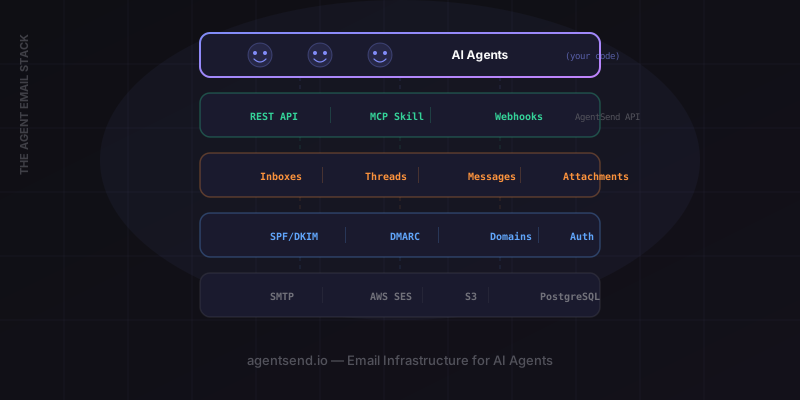
AI agents have crossed the line from toy demos to production systems. They schedule meetings, process invoices, negotiate with vendors, triage support tickets, and run multi-step research workflows. But production agents share one critical need: they have to communicate with the real world. And for all the advances in messaging protocols, APIs, and chat platforms, email remains the universal communication layer of business. Every company, every vendor, every government agency, every customer has an email address. If your agent cannot send and receive email, it is cut off from the single largest communication network on the planet.
The instinct is to reach for an existing email service and bolt it on. Call an SMTP server, use a transactional email API, maybe configure a forwarding rule. But this is where most teams hit a wall. The tools that exist today were built for a different era and a different use case. AI agents need purpose-built email infrastructure — an agent-first email stack — and the gap between what exists and what agents need is wider than it first appears. (For a detailed comparison, see AgentSend vs SendGrid vs Resend vs Mailgun.)
The Problem with Repurposing Traditional Email Tools
Services like SendGrid, Mailgun, and Amazon SES are excellent at what they were designed for: letting applications send email to humans. Transactional receipts, marketing campaigns, password resets, notification digests. They have been refined over a decade to solve the one-way, app-to-human email problem at scale.
But AI agents are not applications sending notifications to humans. They are autonomous actors that need to participate in email as peers — sending, receiving, replying, threading, and managing multiple conversations simultaneously. The assumptions baked into traditional email tools break down in three fundamental ways:
- One sender identity. Traditional tools assume your application has a single sending identity (or a small, static set). AI agents need many identities — one per agent, provisioned dynamically, sometimes spun up and torn down within minutes.
- One-way communication. SendGrid and SES are optimized for outbound. Receiving email is either unsupported, bolted on as an afterthought (SES Inbound), or requires separate infrastructure. For agents, receiving is just as important as sending — often more so.
- Human-configured setup. Every traditional email service requires a human to configure domains, verify DNS records, set up routing rules, and manage API keys through a dashboard. Agents need zero-human provisioning — the ability to create a fully functional inbox with a single API call.
The result is friction everywhere. Teams hack together Frankenstein stacks: SES for outbound, a separate inbound parsing service, a custom threading layer on top, manual domain configuration for every new agent. It works, barely, until you need to scale past a handful of agents or handle edge cases like attachments, bounce management, or conversation context. The mismatch between what traditional tools offer and what agents need creates a tax on every team building agent-powered products.
The core mismatch: Traditional email services treat email as a delivery mechanism. Agent email infrastructure treats email as a communication protocol — bidirectional, contextual, and programmable from the ground up.
What Agent-First Email Infrastructure Looks Like
If you were designing an email stack from scratch for AI agents — with no legacy assumptions — what would it look like? Here are the properties that matter:
Programmatic inbox creation
A single API call creates a real, working email address. No DNS configuration, no human approval, no dashboard clicks. The agent (or the system that manages agents) provisions an inbox and gets back an address that can send and receive immediately. This is the foundation — without it, you cannot dynamically scale your agent fleet.
Bidirectional by default
Send and receive are first-class operations, both available from day one on every inbox. There is no separate "inbound" configuration. When you create an inbox, it can receive. When you call the send API, it sends. The symmetry matters because agent workflows are inherently conversational — an agent receives a request, processes it, replies, receives follow-up questions, and replies again.
Webhook-driven delivery
Incoming email triggers your agent's code in real-time via webhook. No polling, no IMAP connections, no message queue to manage. A message arrives, and within seconds your agent's webhook endpoint receives the full payload — sender, subject, body, attachments, thread context. This is the event-driven model that modern agent architectures expect.
Thread context
Every message belongs to a thread, and the full conversation history is accessible via API. When your agent receives a follow-up, it can fetch the entire thread to understand context before responding. This is critical for agents handling multi-turn conversations — without thread context, every incoming message is an island.
Multi-agent support
The infrastructure supports dozens or hundreds of agents, each with its own inbox, its own webhook, and its own thread history. There is no shared state between agents. Provisioning a new agent is the same API call whether it is your first or your five-hundredth. Tearing down an agent cleans up its inbox and all associated data.
Custom domains
Agents send from your brand's domain — support-agent@yourcompany.com, not a generic platform address. Domain verification, SPF, DKIM, and DMARC are handled through the API and dashboard, with clear status reporting. For recipients, the email looks like it came from your organization, because it did.
Attachment handling
Agents can receive files (contracts, invoices, reports, images) and send files back. Incoming attachments are delivered as part of the webhook payload with download URLs. Outbound attachments are included in the send API call. No separate file storage integration needed.
Architecture Pattern: The Agent Email Loop
The most common architecture for agent email is a loop: provision, receive, process, reply, repeat. Here is how it works in practice with AgentSend:
- Inbox provisioned via API — your system creates an inbox for the agent and registers a webhook URL.
- External party sends email — a customer, vendor, or colleague emails the agent's address.
- Webhook fires — AgentSend delivers the full message payload to your webhook endpoint.
- Agent processes the message — your LLM reads the email, optionally fetches thread history, and generates a response.
- Agent replies via send API — the response is sent back through AgentSend, threaded correctly.
- Thread maintained automatically — subsequent messages in the same conversation are grouped, and full context is always available.
Here is a working implementation of this loop in Python:
import anthropic
import requests
from flask import Flask, request, jsonify

app = Flask(__name__)

AGENTSEND_API_KEY = "your_api_key"
AGENTSEND_BASE = "https://agentsend.io"
claude = anthropic.Anthropic()

# Step 1: Provision an inbox (run once)
def create_agent_inbox(agent_name, webhook_url):
    resp = requests.post(
        f"{AGENTSEND_BASE}/inboxes",
        headers={"Authorization": f"Bearer {AGENTSEND_API_KEY}"},
        json={"name": agent_name, "webhookUrl": webhook_url}
    )
    return resp.json()

# Step 2-3: Receive email via webhook
@app.route("/webhooks/email", methods=["POST"])
def handle_incoming_email():
    payload = request.json
    message = payload["message"]

    # Step 4: Process with Claude
    thread_context = fetch_thread(message["threadId"])
    response = claude.messages.create(
        model="claude-sonnet-4-6",
        max_tokens=2048,
        system="You are a helpful agent. Reply to emails professionally.",
        messages=[{
            "role": "user",
            "content": f"Thread history:\n{thread_context}\n\nNew email from {message['from']}:\n{message['text']}"
        }]
    )
    reply_text = response.content[0].text

    # Step 5: Reply via AgentSend
    requests.post(
        f"{AGENTSEND_BASE}/messages",
        headers={"Authorization": f"Bearer {AGENTSEND_API_KEY}"},
        json={
            "inboxId": payload["inboxId"],
            "threadId": message["threadId"],
            "to": message["from"],
            "subject": f"Re: {message['subject']}",
            "text": reply_text
        }
    )
    return jsonify({"status": "ok"})

# Helper: fetch thread history for context
def fetch_thread(thread_id):
    resp = requests.get(
        f"{AGENTSEND_BASE}/threads/{thread_id}/messages",
        headers={"Authorization": f"Bearer {AGENTSEND_API_KEY}"}
    )
    messages = resp.json().get("messages", [])
    return "\n".join(
        f"{m['from']}: {m['text']}" for m in messages
    )
This is the complete loop. The inbox is created once, and from that point forward the agent autonomously handles every incoming email — reading context, generating a response, and replying — without any human intervention. The thread is maintained automatically by AgentSend, so the agent always has full conversation history available.
Scaling to Multi-Agent Systems
A single agent with an inbox is useful. A fleet of agents, each with its own inbox, is transformative. Consider a production deployment where you have specialized agents for different functions:
- Support agent at
support@yourcompany.com— triages inbound customer issues, responds to common questions, escalates complex cases to humans. - Sales agent at
sales@yourcompany.com— handles inbound leads, qualifies prospects, schedules demos. - Research agent at
research@yourcompany.com— receives research requests from internal teams, gathers information, delivers reports via email. - Ops agent at
ops@yourcompany.com— monitors vendor communications, processes invoices, flags anomalies.
Each agent needs isolation. The support agent should never see sales conversations. The research agent's thread history should not leak into ops. With AgentSend's inbox-per-agent model, this isolation is structural — each agent has its own address, its own webhook endpoint, and its own thread store. There is no cross-contamination by default.
Provisioning is the same API call for every agent. Tearing down an agent removes its inbox and all associated data. You can spin up a temporary agent for a specific project — a due diligence review, an event coordination task, a hiring pipeline — and decommission it when the project ends. The infrastructure scales with your agent fleet, not against it.
# Provision multiple specialized agents
agents = [
    {"name": "support-agent",  "webhook": "https://app.co/hooks/support"},
    {"name": "sales-agent",    "webhook": "https://app.co/hooks/sales"},
    {"name": "research-agent", "webhook": "https://app.co/hooks/research"},
    {"name": "ops-agent",      "webhook": "https://app.co/hooks/ops"},
]

for agent in agents:
    inbox = create_agent_inbox(agent["name"], agent["webhook"])
    print(f"{agent['name']} live at {inbox['address']}")

# Output:
# support-agent live at support-agent@yourcompany.com
# sales-agent live at sales-agent@yourcompany.com
# research-agent live at research-agent@yourcompany.com
# ops-agent live at ops-agent@yourcompany.com
Security and Deliverability
Production agent deployments require the same security and deliverability guarantees as any enterprise email system — arguably more, because agents operate autonomously and mistakes are harder to catch in real-time.
Domain authentication
When you connect a custom domain to AgentSend, the platform guides you through SPF, DKIM, and DMARC configuration. These records prove to receiving mail servers that your agent is authorized to send from your domain. Without them, agent emails land in spam or get rejected outright. AgentSend verifies your DNS records and reports their status through both the dashboard and API, so your provisioning scripts can confirm everything is healthy before an agent starts sending.
Webhook signature verification
Every webhook payload from AgentSend includes a cryptographic signature in the X-AgentSend-Signature header. Your webhook handler should verify this signature before processing any incoming email. This prevents spoofed payloads from triggering your agent's logic — a critical safeguard when your agent takes real-world actions based on email content.
API key management
AgentSend supports multiple API keys per account with scoped permissions. You can issue a key that can only send from a specific inbox, or a key that can create inboxes but not read messages. In multi-agent deployments, this lets you apply the principle of least privilege — each agent or agent manager gets only the access it needs. Keys can be rotated through the API without downtime.
Bounce and complaint monitoring
AgentSend automatically tracks bounce rates and spam complaint rates per inbox. If an inbox exceeds safe thresholds (5% bounce rate or 0.1% complaint rate), sending is automatically paused to protect your domain's sender reputation. This is especially important for agents that send at volume — a misconfigured agent could burn your domain's reputation in hours without automated guardrails.
Production checklist: Before deploying an agent to production, verify your custom domain's DNS records, implement webhook signature checking, scope your API keys, and set up alerts for bounce rate anomalies.
Frequently Asked Questions
What is AI agent email infrastructure?
AI agent email infrastructure is a purpose-built email stack designed for autonomous software agents rather than human users. It provides programmatic inbox creation, bidirectional email (send and receive), webhook-driven delivery, thread context via API, and multi-agent support — all accessible through REST APIs without manual configuration.
Why can't I just use SendGrid for my AI agent?
SendGrid, Mailgun, and SES were designed for applications sending email to humans — transactional and marketing messages. They assume one sender identity, one-way communication, and human-configured setup. AI agents need many identities, bidirectional communication, and zero-human provisioning. The mismatch creates significant friction when you try to build full agent email workflows on top of these tools.
Can each AI agent have its own email address?
Yes. AgentSend's inbox-per-agent model lets you provision a unique email address for each agent with a single API call. Each agent gets its own address, its own webhook endpoint, and its own thread history — completely isolated from other agents in your system.
How does AgentSend handle email deliverability?
AgentSend handles deliverability at the infrastructure level. For custom domains, it automates SPF, DKIM, and DMARC configuration. It monitors bounce rates and complaint rates per inbox, automatically pausing sending if thresholds are exceeded. Shared IP pools are warmed and maintained by AgentSend, and dedicated IPs are available on Enterprise plans.
What does agent email infrastructure cost?
AgentSend offers a free tier with up to 10 emails per day per inbox. Paid plans start at $9/month for 1,000 emails per day with custom domain support, webhook delivery, and priority deliverability. Enterprise plans with dedicated IPs, SLA guarantees, and volume pricing are available for production deployments at scale.
Get Started
Ready to build? Explore these guides for specific agent email patterns:
- AI Email -- What AI email is and how to set it up with code examples.
- AI Mail Infrastructure -- Full architecture for multi-agent email systems.
- Send Email from an AI Agent -- 5-minute quickstart with Python, Node.js, and cURL.
- Customer Support Agent -- Triage, resolve, and escalate email tickets.
Build Your Agent's Email Stack
Purpose-built email infrastructure for AI agents. Free tier available. Your first agent inbox is live in under 30 seconds.
Start for Free →